網頁

顯示具有 SQLite 標籤的文章。 顯示所有文章

2010年10月14日 星期四

Visual Web Developer 2010 Express use SQLite


首先產生一個 Web Site,方法和以前的版本其實大同小異,最後產出的結果會因版本差異,目錄結構不一樣而已。


SQLite是嵌入式資料庫,被定位成單機用的,所以在ASP.NET Web Site 這種多人連線環境並不支援。所以在開發上並不是很便利,你無法透過編輯器提供的功能來新增DataSource,一切都要自己寫程式碼來進行SQLite的操作。(應該可以透過Regedit去修改Visual Web Developer 2010 Express的機碼,針對Add New Item這部份來新增這項目,方便以後新增DataSource,只是修改機碼有其風險性,這邊就沒去仔細研究了)

要讓 SQLite 能正常運作,有幾個重要步驟如下:
1. 在方案中使用[加入參考],將 System.Data.SQLite 加入方案中,此時 web.config 檔案中會多出一段設定。

<assemblies>
<add assembly="System.Data.SQLite, Version=1.0.66.0, Culture=neutral, PublicKeyToken=DB937BC2D44FF139"/>
</assemblies>


2. 在方案中的 App_Data 目錄選擇 [加入現有項目],將要使用 SQLite 檔案加進來。

3. 修改 web.config,加入 connectionString 設定

<connectionStrings>
    <add name="SQLiteService" connectionString="Data Source=|DataDirectory|Your.db;Version=3;" providerName="System.Data.SQLite"/>
</connectionStrings>


4. 在網頁(*.cs)新增操作 SQLite 的相關語法。

    protected void Page_Load(object sender, EventArgs e)
    {
        string sqliteFilePath = Server.MapPath("~/App_Data/Your.db");
        using (SQLiteConnection conn = new SQLiteConnection("Data Source=" + sqliteFilePath))
        {
            using (SQLiteCommand comm = conn.CreateCommand())
            {
                conn.Open();

                comm.CommandText = "select * from [YourData]";
                SQLiteDataReader dr = comm.ExecuteReader();
                while (dr.Read())
                {
                    Response.Write("Id " + System.Convert.ToString(dr["Id"]) + "<br />");
                }
            }
        }
    }


從方案中的 [在瀏覽器中檢視]就可以看到實際結果了。

閱讀全文...

2010年10月12日 星期二

Connect to multiple database with Java


這應該是常會遇到的狀況,當要從一個資料庫轉出資料到另一種資料庫時,如果importexport不符合使用,就必須手動來撰寫符合這樣需求的工具了。

Java是透過JDBC來連接資料庫,所以只要找到資料庫適當的driver,並透過Class.forName method來載入和註冊jdbc driver,就可以操作資料庫了。


下面是一個從Oracle轉出資料,再將資料轉入SQLite的例子(使用前請先將相關資料庫資料和SQL語法改成符合你所需的)
Oracle2SOLite.java

import java.sql.Connection;
import java.sql.DriverManager;
import java.sql.ResultSet;
import java.sql.SQLException;
import java.sql.Statement;

// http://www.oracle.com/technetwork/indexes/downloads/index.html
// JDBC Driver->ojdbc14.jar
// http://www.xerial.org/trac/Xerial/wiki/SQLiteJDBC
// JDBC Driver->sqlite-jdbc-3.7.3.jar

public class Oracle2SQLite {
    public static void main(String[] args) {
        String driver = "oracle.jdbc.driver.OracleDriver";
        String url = "jdbc:oracle:thin:@ip:port:name";
        String user = "user";
        String password = "pwd";
       
        String driver1 = "org.sqlite.JDBC";
        String url1 = "jdbc:sqlite:D:/Work/sample.db";
       
        Connection conn = null;
        Connection connection = null;
        Statement stmt = null;
        Statement statement = null;

        System.out.println("***** Start *****");
        try {
            System.out.println("1. connect to " + url);
            Class.forName(driver);
            conn = DriverManager.getConnection(url, user, password);
            stmt = conn.createStatement();

            System.out.println("2. connect to " + url1);
            Class.forName(driver1);
            connection = DriverManager.getConnection(url1);
            statement = connection.createStatement();
           
            StringBuffer sqlStr = new StringBuffer();
            // 組合相關 Select 語法
            sqlStr.append("SELECT * FROM Sample");

            System.out.println("3. query");
            StringBuffer sqlOut = new StringBuffer();
            ResultSet result = stmt.executeQuery(sqlStr.toString());
            System.out.println("4. insert");
            while(result.next()) {
                sqlOut.delete(0, sqlOut.length());
                // 組合 Insert 語法
                sqlOut.append("INSERT INTO TxnData VALUES('XXX', 'YYY', 'ZZZ')");
               
                statement.executeUpdate(sqlOut.toString());
            }
        }
        catch(ClassNotFoundException e) {
            System.out.println("找不到驅動程式: " + e.getMessage());
            e.printStackTrace();
        }
        catch(SQLException e) {
            e.printStackTrace();
        }
        finally {
            if(stmt != null) {
                try {
                    stmt.close();
                }  
                catch(SQLException e) {
                    e.printStackTrace();
                }
            }
            if(conn != null) {
                try {
                    conn.close();
                }
                catch(SQLException e) {
                    e.printStackTrace();
                }
            }

            if(statement != null) {
                try {
                    statement.close();
                }  
                catch(SQLException e) {
                    e.printStackTrace();
                }
            }
            if(connection != null) {
                try {
                    connection.close();
                }
                catch(SQLException e) {
                    e.printStackTrace();
                }
            }
        }
    }
}


閱讀全文...

2010年10月6日 星期三

SQLite with Java

一般java都是透過jdbc來連接資料庫,為了連接SQLite,就必須要有SQLite JDBC Driver,但SQLite官方並沒有提供這方面的Driver

這次採用的是xerial:SQLiteJDBC Driver (第一次使用,會挑上它,是因為感覺還有在維護和更新),請選擇最新版本下載,在 Windows, MAC & Linux 都適用。網站上還提供了說明和 Sample code 方便修改測試。


import java.sql.Connection;
import java.sql.DriverManager;
import java.sql.ResultSet;
import java.sql.SQLException;
import java.sql.Statement;


public class Sample
{
  public static void main(String[] args) throws ClassNotFoundException
  {
    // load the sqlite-JDBC driver using the current class loader
    // 載入與註冊JDBC驅動程式:
// 透過Class類別的forName()來載入,透過DriverManager註冊JDBC驅動程式(驅動程式會自動透過DriverManager.registerDriver()方法註冊)
    Class.forName("org.sqlite.JDBC");
   
    Connection connection = null;
    try
    {
      // create a database connection
      // 設定JDBC URL(即定義連接資料庫的協定:子協定:資料來源識別)並從DriverManager取得Connection
      connection = DriverManager.getConnection("jdbc:sqlite:D:/Study/SQLiteJDBC/sample.db");
      Statement statement = connection.createStatement();
      statement.setQueryTimeout(30);  // set timeout to 30 sec.
     
      statement.executeUpdate("drop table if exists person");
      statement.executeUpdate("create table person (id integer, name string)");
      statement.executeUpdate("insert into person values(1, 'leo')");
      statement.executeUpdate("insert into person values(2, 'yui')");
      ResultSet rs = statement.executeQuery("select * from person");
      while(rs.next())
      {
        // read the result set
        System.out.println("name = " + rs.getString("name"));
        System.out.println("id = " + rs.getInt("id"));
      }
    }
    catch(SQLException e)
    {
      // if the error message is "out of memory",
      // it probably means no database file is found
      System.err.println(e.getMessage());
    }
    finally
    {
      try
      {
        if(connection != null)
          connection.close();
      }
      catch(SQLException e)
      {
        // connection close failed.
        System.err.println(e);
      }
    }
  }
}
 

閱讀全文...

2010年6月11日 星期五

好用的SQLite資料庫管理工具

SQLite Expert Personal 好像的視覺化SQLite資料庫管理工具,請至 http://www.sqliteexpert.com/ 下載,免費的 Personal 版本就灰熊好用。
閱讀全文...

2010年5月28日 星期五

SQLite with Visual Studio 2005

採用 System.Data.SQLite(http://sqlite.phxsoftware.com/) -An open source ADO.NET provider for the SQLite database engine
請至 http://sourceforge.net/projects/sqlite-dotnet2/files/ 下載安裝檔案,我下載的是2010/04/18的版本SQLite-1.0.66.0-setup.exe(下載最新的就對了)

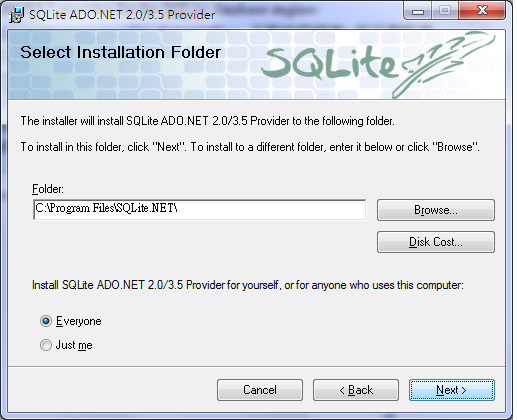
1. 安裝,重點就是一直按 Next,安裝目錄用預設值,把你現有的開發環境勾起來(我的是Visual Studio 2005),就會自動裝好了。


2. 測試
2.1 開啟一個新的 C# Console Application Project
2.2 專案開啟後,首先最重要的一步,就是 Add Reference,將System.Data.SQLiteSystem.Data.SQLite.Linq加進專案中。
2.3 主要程式碼如下
using System;
using System.Collections.Generic;
using System.Text;
using System.Data.SQLite;
using System.IO;

namespace SQLiteTest1
{
    class Program
    {
        public static SQLiteCommand cmd;

        public static void CreateTable()
        {
            string sql = "CREATE TABLE user(" +
                            "id INTEGER PRIMARY KEY, " +
                            "name text, " +
                            "sex int(1) NOT NULL DEFAULT 0 " +
                         ")";
            cmd.CommandText = sql;
            cmd.ExecuteNonQuery();
        }

        public static void DropTable()
        {
            string sql = "DROP TABLE user";
            cmd.CommandText = sql;
            cmd.ExecuteNonQuery();
        }

        public static void AddUser(string name, int sex)
        {
            string sql = " INSERT INTO user (name, sex) " +
                         " VALUES ('" + name + "', " + sex + ") ";
            cmd.CommandText = sql;
            cmd.ExecuteNonQuery();
        }

        public static void ListAllUser()
        {
            SQLiteDataReader sdr;

            string sql = "SELECT * from user";
            cmd.CommandText = sql;
            sdr = cmd.ExecuteReader();

            Console.WriteLine("ID\tNAME\tSEX");
            Console.WriteLine("------------------------------------------------");
            while (sdr.Read())
            {
                Console.WriteLine("{0}\t{1}\t{2}",
                    sdr["id"],
                    sdr["name"],
                    sdr["sex"]);
            }
        }

        static void Main(string[] args)
        {
            SQLiteConnection conn = null;

            try
            {
                string strDatabaseRoot = Directory.GetCurrentDirectory() + "\\SQLiteTest1.db";

                if (!File.Exists(strDatabaseRoot))
                {
                    SQLiteConnection.CreateFile(strDatabaseRoot);
                }

                conn = new SQLiteConnection("Data Source=" + strDatabaseRoot);
                conn.Open();
                cmd = conn.CreateCommand();
                DropTable();
                CreateTable();

                AddUser("Dick", 1);
                AddUser("Mary", 0);
                AddUser("GiGi", 0);
                ListAllUser();

            }
            catch (Exception e)
            {
                Console.WriteLine(e.Message);
            }
            finally
            {
                if (conn != null)
                {
                    conn.Close();
                }
            }

            Console.ReadLine();
        }
    }
}

Output:

閱讀全文...

小巧實用的資料庫 SQLite

資料庫一直是程式開發中不可或缺的好幫手,但現在許多有名的資料庫包山包海給你重量型的規格,當然也是重量型的價格。可是當你只是開發一個需要儲存,資料量不大,只需要單機使用,或是沒多人同時使用的需求,你會想搬出 Oracle、DB2和SQL Server嗎?No,此時不需要這種怪獸級的產品,SQLite會是個不錯的選擇。

SQLite(http://www.sqlite.org/index.html) 是一套 Embedded RDBMS,很適合加進應用程式裡頭跑,並且資料庫檔能輕鬆跨平台。一般的SQL92語法都有支援,單一檔案,不需要安裝科學怪獸,只需要寫程式時將他加入一起編譯就好了。

SQLite特性優缺點和支援的平台及程式語言,請拜請 Google 大神一撈或是光臨SQLite網站就有了。容我偷懶,光速逃。
閱讀全文...